


Should UX Designers Trust AI with User Behaviour Analysis?
- Ruwanthi Sulanjali
- Jul 22, 2025
- 8 min read

Updated: Aug 11, 2025
Lessons from Using Generative AI for Heatmaps and Design Decisions
The main reason for writing this blog is that one of my mentees was asked by his team lead to use AI to analyse user behaviour. I wanted to demonstrate how generative AI can act as a valuable team member in the UX process, supporting our work rather than replacing human judgement, especially in a world that often values quantity over quality. For example, some agencies might want numerous user behaviour reports generated quickly using AI, without checking whether those reports are actually accurate or useful for real design decisions.

Problem
In many UX teams, there is growing pressure to produce numerous AI-generated user behaviour reports quickly. While this satisfies the demand for speed and volume, it often risks overlooking the accuracy, depth, and practical value of the insights. This trend can lead to design decisions based on incomplete or misleading information, especially when AI outputs are accepted without human review.
Methods
Used AI-powered Microsoft Clarity’s “Summarise heatmaps” feature to analyse user interactions.
Ran prompt-based queries in ChatGPT and Perplexity AI to gather UX-related insights and recommendations.
Compared AI-generated outputs with human interpretation to assess accuracy and relevance.
Improvements
Encourage the use of multiple AI tools and iterative prompt testing to refine the quality of outputs.
Always apply UX expertise to verify AI insights, ensuring they are relevant, actionable, and aligned with project goals.
Treat AI as a collaborative assistant, not a replacement for human analysis.
Results
AI tools delivered fast summaries and ideas, reducing time spent on initial data exploration.
Outputs were sometimes too general or missed specific behaviour patterns (e.g., clicks, scroll depth, attention focus).
ChatGPT and Perplexity AI were effective in reminding designers of principles and suggesting ideas, but occasionally produced irrelevant or inaccurate recommendations.
Combining AI speed with human critical thinking resulted in more accurate and useful behaviour insights for UX decisions.
Do generative AI tools really help with UX work?
The simple answer is YES, but with important LIMITATIONS. AI tools can support UX designers in various ways, such as predicting user behaviour, personalising experiences, and streamlining prototyping (Soegaard, 2025). Liu, Zhang, and Budiu (2023) also highlight how generative AI bots assist UX professionals as content editors, research assistants, brainstorming partners, and design helpers.
However, if you believe you can do all design work without any human design knowledge by relying solely on AI, I would love to hear about your end-user experience.
Some argue AI tools might replace designers, researchers, or even end users (Liu and Moran, 2023). Yet, we must be cautious and not trust everything AI generates because all tools have limitations. It’s very important to request for different versions, try various tools and prompts, and especially apply UX knowledge to evaluate the truthfulness of AI outputs. Not all AI-generated content is accurate or reliable.
With this mindset, I started experimenting to see how AI can support me as a teammate in data analysis and how it fits into collaborative settings.

My experience using AI in UX design
As a UI/UX designer and web developer, AI tools have supported me multiple times a day. I use generative AI like ChatGPT, Midjourney, and Adobe Firefly, just as many designers do.
However, if any company thinks AI can completely replace human roles right now, that mindset may be premature.
By the end of this blog, you will understand why. AI is not yet fully trained to grasp every nuance of human behaviour or context, but it can certainly serve as a valuable team member (assisting, suggesting, and analysing) while final decisions remain human-led.
What you will find in this blog
Experiments conducted using AI for user behaviour analytics
Heatmap analysis using Microsoft Clarity AI
Prompt-based insights from ChatGPT and Perplexity AI
My reflections and analysis
How AI suggestions combined with personal expertise improved results
Experiment 1: Heatmap Analysis with Microsoft Clarity AI
I have previously explained how I boosted conversions using MS Clarity heatmap and video behaviour analysis in this UX case study.
For this new project, I wanted to experiment further with AI. Earlier attempts were ineffective, so this time I used a different approach.
In the MS Clarity heatmap interface, I simply clicked “Summarise heatmaps” (Figure 3), and within minutes, I received an analysis of user behaviour and key takeaways. While the process was very fast, the question remained: how useful was this analysis? (Figure 5 and 6).
It’s important to remember to carefully review AI-generated content to verify its accuracy.
MS Clarity itself cautions that “mistakes are possible.”

My first impression was that the analysis was too shallow.
Usually, I note many detailed insights when analysing heatmaps, but this AI-generated data only provided a rough overview.
Limitation: If I focus only on homepage PC clicks and use MS Clarity AI, it generates the results as a single summary (Figure 3), providing just one point each for mobile, tablet, and desktop. It does not provide separate heatmap analyses for clicks, scrolls, or attention.However, ChatGPT and Perplexity can help with separate analyses (Figures 5 and 6).
After documenting this data, I uploaded the heatmap images into ChatGPT Plus (which supports multiple images) and perplexity for further iterations. Later, I compared all insights with my own analysis and made improvements (Figure 5 and 6).
Experiment 2: Using ChatGPT and Perplexity AI for Analytical Summaries
Next, I used ChatGPT and perplexity to analyse heatmaps, experimenting with different prompts to elicit the level of detail needed for the next iteration of design work. Moran (2024) advises that effective outcomes from generative AI require thoughtfully crafted prompts that provide context, specify the task, outline guidelines, and include examples.
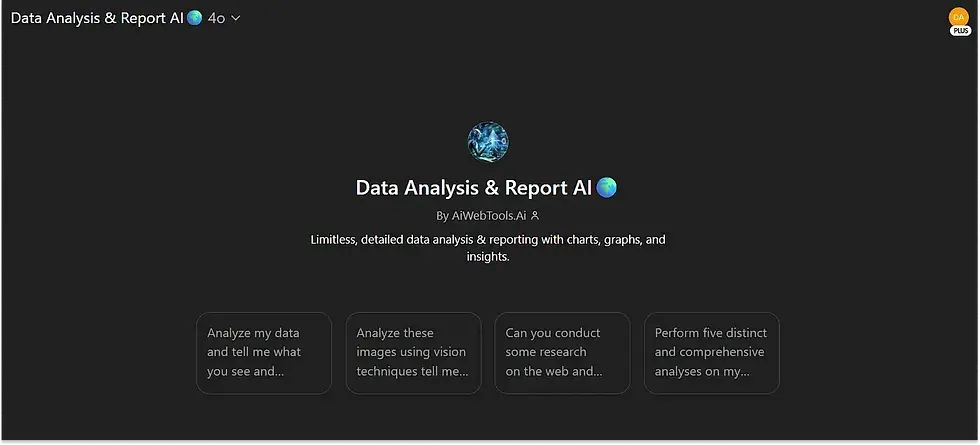
In Chat GPT, I chose the “Data Analysis and Report AI” GPT variant because it delivers more detailed insights than the standard chat interface.
Here’s a recent prompt that worked fairly well (though not perfectly):
“Context: I’m a UX designer working on a CRO project. We’re updating the [X] client homepage [Home page link] to improve conversions.
Ask: You’re a UX analyst / UX researcher.
Analyse the attached MS Clarity heatmaps.
Describe what the user behaviour looks like.
Share what you can see that is good or bad.
Suggest improvements.
Rules:
Tone: clear, approachable, and action-oriented
Consider design principles, guidelines, best practices (e.g. Shneiderman’s 8 golden rules, Nielsen Norman heuristics, usability goals, and visual design principles)
Consider design trends and competitor opportunities
Avoid jargon and superlatives
Examples: Not included**”
**In this experiment, I didn’t add examples because sometimes if I add examples, it only gives data based on that area, and I didn’t want it to be fixed in a box. In the “Rules” section, I listed the design principles and guidelines clearly. But if you like, you can try adding examples. It didn’t work earlier for me, so I didn’t include them here.
If you have better prompt suggestions, I’m happy to experiment further.
The speed of AI responses is impressive, but the key question remains: how reliable are these insights?
After a quick review, I found some points questionable when cross-checked against my own knowledge and observations. Some recommendations were helpful, while others missed the mark (Figure 5 and 6).
Experiment 3: My ( human ) analysis and key takeaways for the final output
After gathering AI-generated data from MS Clarity, ChatGPT, and Perplexity, I conducted my own analysis to explore how deeply I could redesign the page.
I performed two analyses:
Heatmap data (clicks, scrolls, and attention analysis)
Session recordings to observe real user behaviour and identify confusion points
I especially value session recordings because they reveal where users get stuck or frustrated.
Note: This section focuses solely on analysing homepage PC clicks. Although analyses were conducted for PC, mobile, tablet, scroll behaviour, and attention patterns, listing every finding here would make the blog too long.
Home page clicks analysis [PC]
![Figure 5: Homepage clicks [PC] — Human and AI analysis for heatmap insights](https://static.wixstatic.com/media/6f9c4a_d8ac33ae522d45d2b5489d4e4bd68c9f~mv2.png/v1/fill/w_980,h_567,al_c,q_90,usm_0.66_1.00_0.01,enc_avif,quality_auto/6f9c4a_d8ac33ae522d45d2b5489d4e4bd68c9f~mv2.png)
Session recording analysis
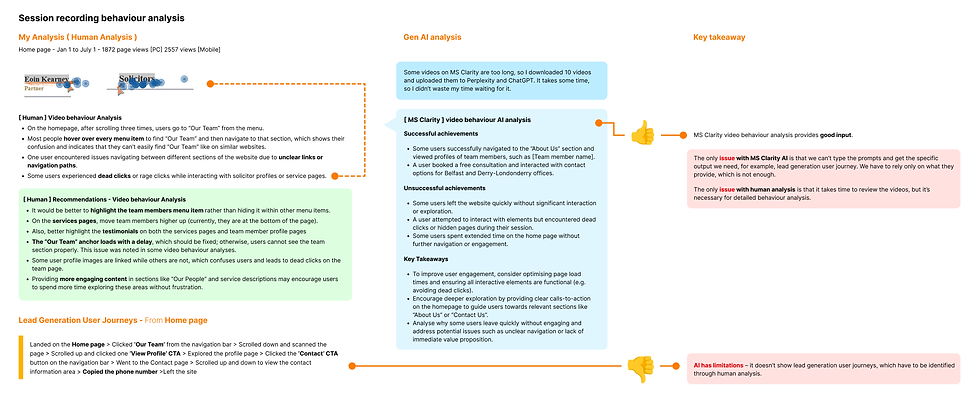
I reviewed over 10 session recordings for human analysis and used MS Clarity AI to analyse the top 10 videos.
Limitation: I tried uploading one video to Perplexity AI but had to reduce its size due to file limits, a lengthy process if done for many videos. Thus, I relied on AI for quicker outputs but depended on human-led insights for deeper understanding.
Here, you can see how human and AI analyses for video behavior analysis complement each other, leading to better-informed design decisions.
Key Takeaways
As many experts have noted, AI has clear limitations. It is a valuable team member, not a replacement. Based on my experience, we cannot fully rely on AI for detailed user behaviour analysis such as heatmaps and session recordings.
For example, some ChatGPT and most Perplexity AI heatmap analyses contained errors. If redesigns were based solely on these, we could see no improvement, or worse, performance could decline.
This is where human insight is crucial.
On the flip side, Perplexity AI surfaced some points I had missed. When overwhelmed with data, even experienced designers can overlook principles and guidelines, at those moments, AI can serve as a helpful teammate, highlighting blind spots.
Another major limitation is that current generative AI tools cannot access external links directly (including MS Clarity URLs). We must download videos or export session data, then upload files within AI size limits, which is time-consuming. MS Clarity’s AI analysis was helpful but often generic, without the ability to add prompts. Improvements are likely in the future, but for now, it speeds up a time-intensive process.
For lead-generation user journeys, combining Google Analytics with session recordings remains mostly a human-led task based on my experience. This is mainly because MS Clarity’s video behaviour analysis doesn’t capture all the necessary details, and it doesn’t allow adding text prompts for specific insights.
ChatGPT and Perplexity also have limitations with uploading videos, so user journey analysis is still largely human-led. This approach provides a clearer understanding of which pages need to be redesigned first, rather than wasting time redesigning every page without knowing their actual impact.
Suggestions on improving this workflow are welcome.

Conclusion
Generative AI has proven itself to be a valuable team member in UX work rather than a full replacement for human expertise.
These experiments showed that while AI tools like Microsoft Clarity AI, ChatGPT, and Perplexity can speed up data analysis and provide fresh perspectives, their outputs often lack the depth and contextual understanding needed for confident design decisions.
Heatmap summaries from MS Clarity AI were fast but generic, missing the nuanced behavioural insights that human analysis could uncover. It also has the limitation of not allowing text prompts to request more detailed data.
ChatGPT and Perplexity offered quick suggestions, but their recommendations were sometimes incorrect or irrelevant, highlighting the risks of fully relying on AI without human evaluation. Yet, they often reminded me of design principles or insights I might overlook when overwhelmed by data, proving their strength as supportive brainstorming partners. However, they also have limitations, such as being unable to analyse video-based user behaviour or lead generation user flows.
Ultimately, AI tools are most effective when treated as collaborative team members, assisting with analysis, suggesting ideas, and speeding up repetitive tasks, while critical decisions remain human-led. Combining AI-generated insights with personal expertise ensures designs are grounded in real user behaviour and context rather than assumptions or incomplete automated summaries.
Instead of replacing designers or researchers, AI can empower teams to work smarter and iterate faster, as long as its limitations are acknowledged and its outputs are critically evaluated before implementation.
Reference
Liu, F. and Moran, K. (2023) AI-Powered Tools for UX Research: Issues and Limitations. Available at: https://www.nngroup.com/articles/ai-powered-tools-limitations/ (Accessed: 7 July 2025).
Liu, F., Zhang, M. and Budiu, R. (2023) AI as a UX Assistant. Available at: https://www.nngroup.com/articles/ai-roles-ux/ (Accessed: 7 July 2025).
Moran, K. (2024) CARE: Structure for Crafting AI Prompts. Available at: https://www.nngroup.com/articles/careful-prompts/ (Accessed: 15 July 2025).
Soegaard, M. (2025) 8 Best AI Tools for UX Designers. Available at: https://www.interaction-design.org/literature/article/ai-tools-for-ux-designers (Accessed: 7 July 2025).
![[UX Case Study] How UX Design Quadrupled a Law Firm’s Homepage Conversions](https://static.wixstatic.com/media/6f9c4a_d1e72d4eb3eb41a3a17bf5febba20502~mv2.webp/v1/fill/w_980,h_655,al_c,q_85,usm_0.66_1.00_0.01,enc_avif,quality_auto/6f9c4a_d1e72d4eb3eb41a3a17bf5febba20502~mv2.webp)


Comments